
As the Netgear ReadyNAS servers are getting older, you will get into some software related problems wrt. compatability with MS Windows, as Windows are disabling old techniologies and features.
As an example I have ran into an error stating "Microsoft Windows Network: The network path was not found." (See below picture).
In my example I have named the ReadyNAS server "UMBRIEL-07".
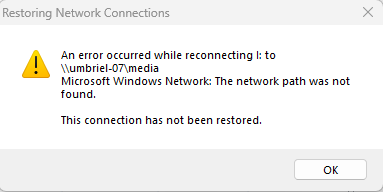
This error suddenly appeared when trying to view the server content in "File Explorer", and I had made no changes to my pc, and spent quite a bit of time before I figure this one out.
If you do a google search, you will find a lot of suggestions, but most of these are more of the generic types such as asking you to reboot both devices, and all other things that you most likely would have tried before you started searching online for an answer.
After a lot of wasted time I found that Windows in a recent update had turned off the access to SMB 1.0, and that this was the reason for the lost access to my ReadyNAS. I therefore had to simply click the Windows start button, and then search for "Windows Features", which then brought me to the the "Turn Windows features on or off" screen.

In that box, I scrolled down, and activated SMB 1.0, and did a PC reboot (not sure if such a reboot is required), and viola, I could again access my ReadyNAS server.
An extra hint in case your pc still does not see your ReadyNAS in File Explorer, is to simply search for it in the top address field of your file explorer.
You will then have to enter to backslash'es followed with the name of your ReadyNAS. E.g.
\\UMBRIEL-07
For ease of access later on, I suggest you consider to map the drive by rightclicking on your shares, and then choose "Map network drive". This will map that share to on you the drive letters, and you can then later on fin it easily by opening file explorer and clicking on the share in the menutree on the left.
.....and, by the way, Windows might after a while again disable the SMB 1.0 during some Windows update. This due to some critical flaws and vulnerabilities, so be careful if you want to continue using your outdated ReadyNAS servers, as that opens up another can of worms.